Missed the street name or the room number someone just mentioned, and the conversation has already moved on? Until now the only fix was an awkward request to repeat it. Apple’s latest developer beta adds another option: owners of the newest Apple Watch models can ask the watch to show what was said a moment ago.
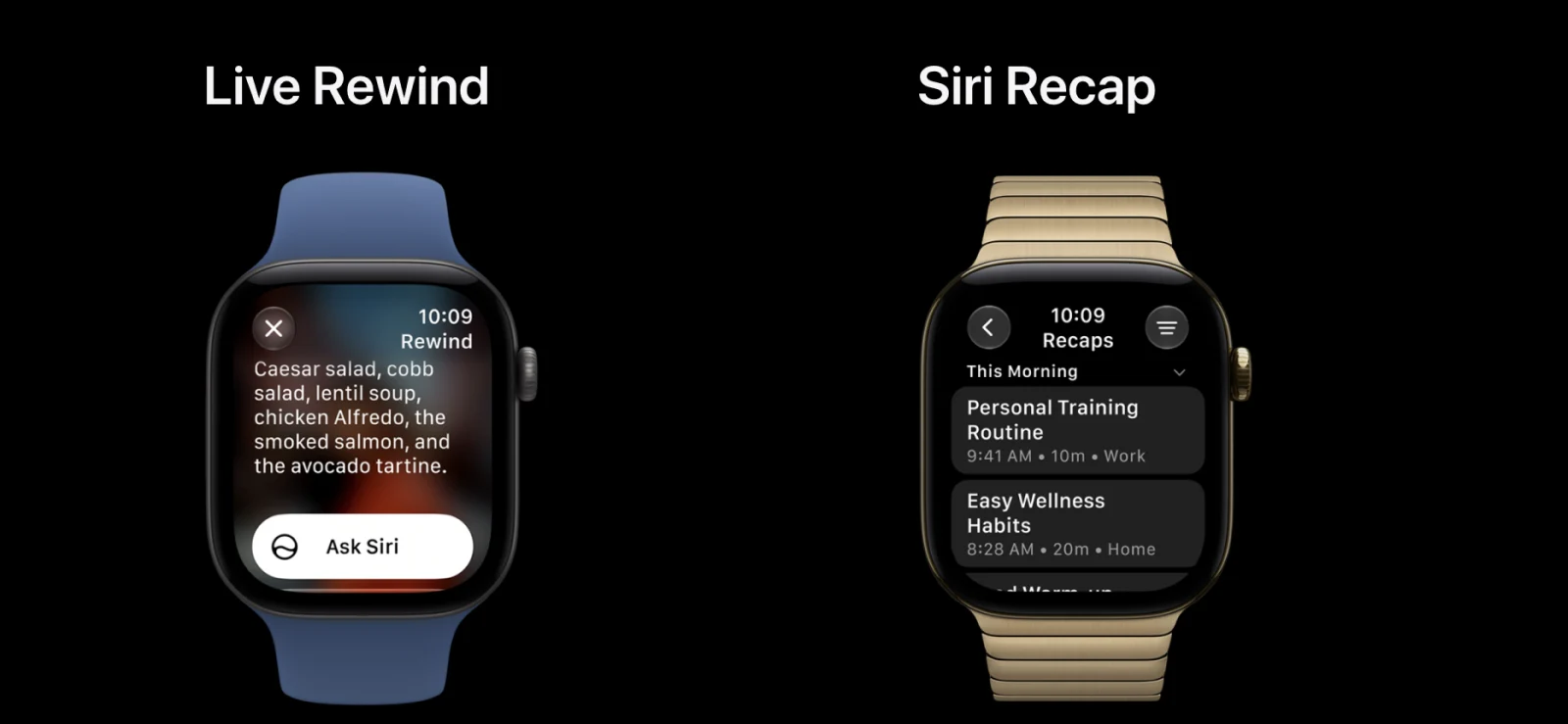
The feature is called Live Rewind, and it arrives in the first developer beta of watchOS 27.3, released together with iOS 27.3. It belongs to the Audio Intelligence set that Apple announced at its September event, alongside Siri Recap. We have not tested it ourselves, so what follows relies on Apple’s description and on reports from other outlets. The initial beta supports only English and is not available in the EU, and the materials we found do not say anything about Ukraine, so availability here is unconfirmed.
How Live Rewind works
A double press of the Digital Crown makes the watch display a text transcript of the previous 15 seconds of conversation. The snippet can be read and left alone, saved to the Siri app for later notes, or used to ask Siri a follow-up question, for example about an address you caught only in part. If it is neither saved nor sent to Siri, the text disappears about 30 seconds after the display dims. The snippet is generated on the watch and the paired iPhone, while saving it or asking Siri about it sends it to Apple’s Private Cloud Compute. The window is short, so the feature suits a single missed detail rather than a longer exchange.
Live Rewind has to be switched on first, from the Siri section of the Watch app or the watch’s own settings. Setup also includes a pairing step in which the watch is held near the iPhone so the two devices can authorize each other.
Which devices support it
Live Rewind and Siri Recap are limited to the Apple Watch Series 12 and Apple Watch Ultra 4, which are built around the S11 chip, so older models are left out. The watch must be paired with an iPhone 16 or later, excluding the iPhone 16e, running iOS 27.3 with Apple Intelligence and Siri AI turned on. The iPhone also needs Secure Exclave hardware, which is why the iPhone 15 Pro models are not supported either. Siri Recap, the companion feature, detects conversations during the days, hours and places the user chooses and writes a title, a summary and key points in the Siri app.
That chain of requirements makes Live Rewind a weak reason to replace a watch on its own: it is still a beta, it works only in English for now, and it depends on a recent iPhone. MacRumors expects the final watchOS 27.3 in December, but that is the outlet’s projection and not an Apple announcement.
Privacy safeguards
Because the feature deals with other people’s speech, Apple added several safeguards. Activating Live Rewind plays a chime even when the watch is on silent or headphones are connected, and the screen shows a full-screen animation and a microphone indicator, so people nearby can tell it is in use. Apple says the feature does not identify or attribute speakers and excludes sensitive information such as financial details and government-issued identifiers. Text snippets are end-to-end encrypted, and a Live Rewind transcript cannot be captured in a screenshot.
Більше новин в телеграмі