Ask Gemini comes to YouTube on the big screen
YouTube has started testing the Ask button with Google Gemini integration on TVs. Previously available on mobile and web, the conversational tool is now being adapted for YouTube smart TV AI and AI on streaming devices — smart TVs, consoles, and set-top boxes.
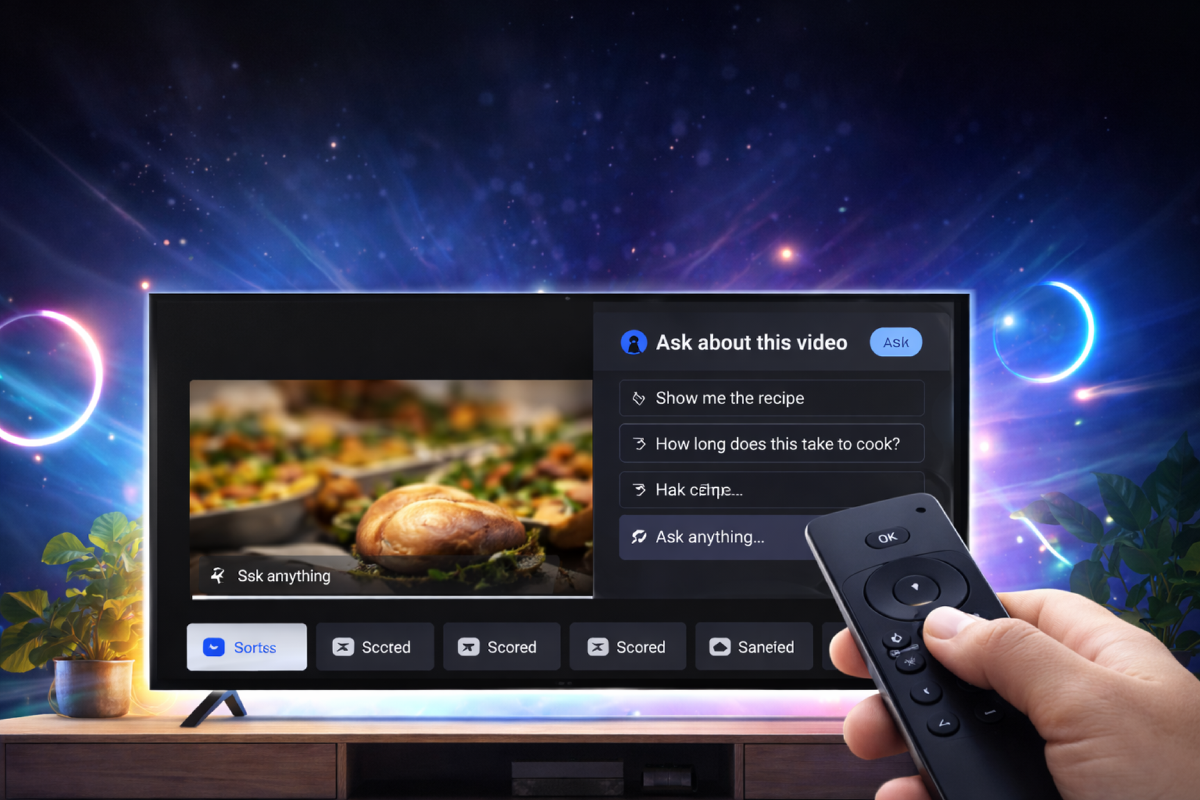
This is not a separate app and not traditional voice search. Conversational AI YouTube is embedded directly into video playback. While watching, users see an Ask button that opens an AI panel. They can ask questions about what is happening on screen and receive answers without switching tabs or leaving the video.
This changes the logic of watching. TV used to be a passive consumption tool. Now YouTube is testing a model where the viewer interacts with the video. AI assistant YouTube TV acts as a mediator between the content and the user, analyzing context and generating responses.
For the platform, this is a move toward interactivity. For viewers, it turns the big screen into something responsive rather than passive.
What is the Ask button and how Gemini integration works
The Ask button is an interface for accessing Gemini integration within a specific video. By pressing it, users open a panel with suggested prompts or enter their own questions. The system then activates AI search in video, analyzing subtitles, descriptions, metadata, and overall context.
AI assistant YouTube TV works as contextual search inside the video. In cooking content, users can ask about ingredients or timing. In smartphone reviews — about specs, cameras, or battery life. In educational videos — for clarification of complex segments.
Contextual questions video are also generated automatically. The system suggests relevant questions based on what is happening in the video. This is part of the AI prompts video logic designed to encourage interaction.
On TVs, interaction happens through on-screen keyboards or AI remote control voice if the remote has a microphone. Voice search YouTube becomes a conversation rather than a one-time query.
Ask is not a new section of YouTube. It is an AI layer placed over existing content, changing how users interact with videos rather than the videos themselves.
Interface: how interaction works on smart TV
The TV interface changes subtly. During playback, an Ask button appears above the standard controls, opening a side AI panel powered by YouTube smart TV AI.
This is not a separate viewing mode. The video keeps playing while interaction happens in parallel, allowing users to stay within context.
Navigation is built around the remote. Users can type using the on-screen keyboard or rely on AI remote control voice. Voice search becomes a conversational tool instead of simple search.
Navigation also shifts. AI-powered content navigation introduces prompts and clarifications inside the video rather than pushing users to switch content.
AI during playback: what users can ask
The core idea of interactive video questions is to treat video as a knowledge source. AI search in video analyzes the content and allows targeted questions.
Use cases vary by content type. Tech reviews involve specs and usage insights. Cooking videos focus on ingredients and timing. Educational videos help explain complex ideas.
Contextual questions video are tied to specific moments. When a feature appears on screen, AI suggests related questions. As scenes change, suggestions change as well.
AI video summaries provide quick explanations or highlights without skipping through the timeline. They support viewing rather than replace it.
The system works with the specific video rather than the broader web. AI prompts and answers rely on subtitles, structure, and context.
YouTube AI and content personalization
YouTube AI on TV changes recommendation logic. Suggestions are influenced not only by watch history but also by real-time interaction. AI recommendations YouTube respond to user questions.
If someone asks about smartphone specs, the tech interest cluster strengthens. If they ask about recipes, culinary recommendations grow. A new type of behavioral signal appears.
YouTube becomes an adaptive environment. AI assistant YouTube TV influences which videos appear next based on interaction.
Streaming devices and consoles
The testing extends beyond TVs. AI on streaming devices includes consoles and set-top boxes running YouTube on big screens.
YouTube smart TV AI adapts to different device types. Interfaces vary, but the Ask logic remains the same — Gemini integration during playback.
This creates a universal AI layer that works across all big-screen devices linked to a user account.
YouTube Premium Labs connection
The Ask feature evolved from experiments in YouTube Premium Labs, where conversational tools were tested on mobile and web platforms.
TV is the next step. The big screen represents a different viewing pattern with less navigation and more passive watching, making conversational AI especially relevant.
Testing on TVs provides new behavioral data — not just what people watch, but how they interact with content.
What changes for content creators
With AI search in video, content becomes structured information. The system analyzes subtitles, descriptions, and video structure.
Clear explanations, logical flow, and detailed metadata become essential. AI video summaries depend on how well the content is structured.
Creators shift from storytellers to information sources from which YouTube AI builds responses for viewers.

More interesting articles
Більше новин в телеграмі