macOS Tahoe 26.2 Release
macOS Tahoe 26.2 is an update to Apple’s macOS operating system, released as part of the macOS Tahoe branch. The update is available for Mac computers through the standard Software Update mechanism in System Settings and requires a restart to complete installation.
macOS Tahoe 26.2 carries build number 25C56.
General Information
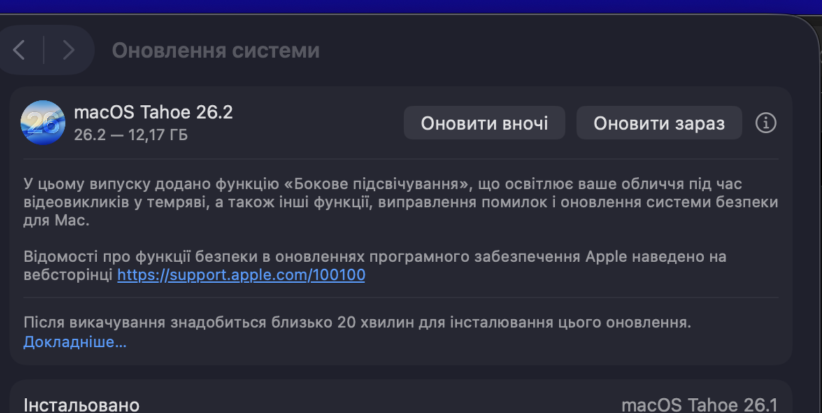
macOS Tahoe 26.2 is distributed as a full system update. The update package size is 12.17 GB, which is typical for releases that include system-level changes, bug fixes, and security updates. The exact download size may vary slightly depending on the system.
After downloading, the system indicates that a restart is required to complete installation. The estimated installation time is approximately 20 minutes, depending on the Mac’s hardware configuration.
New Features
macOS Tahoe 26.2 introduces a feature called Side Lighting. It is designed for use during video calls and provides additional illumination for the user’s face in low-light environments.
The feature is implemented at the operating system level. Apple does not provide detailed technical information or specify which applications support it.
Bug Fixes and Security
The macOS Tahoe 26.2 update includes bug fixes and security updates. Apple states that the update is recommended for all Mac users.
Detailed technical information about security fixes is published separately on Apple’s official software security support pages.
Installation
macOS Tahoe 26.2 is installed via the Software Update section in macOS System Settings. During installation, the Mac restarts, so users are advised to save any open work before proceeding.
Side Lighting
At this time, only ONE new feature is officially confirmed in the update description.
Side Lighting
– a feature for video calls;
– illuminates the user’s face in low-light conditions;
– implemented at the macOS system level;
– mentioned by Apple without technical details;
– no specific supported applications are listed.
This is the only new feature officially named by Apple in macOS Tahoe 26.2.
All other items are standard Apple update descriptions rather than new features.
What Is NOT Considered a New Feature but Is Included
Apple traditionally includes the following items in every release, but they are not considered standalone features:
– system bug fixes;
– macOS security updates;
– internal system improvements.
Apple does not disclose:
– which specific bugs were fixed;
– which modules were changed;
– which components were optimized.
These details appear only in:
– security release notes;
– or developer logs, which are not publicly available at this time.
All Releases Published on December 12, 2025
Version 26.2 updates were released across multiple Apple platforms, including Mac computers, iPhones, iPads, and Apple Watch. Updates are available for supported models according to Apple’s device support policy.
macOS Tahoe 26.2
macOS Tahoe 26.2 is available for supported Mac models compatible with macOS Tahoe, starting with:
MacBook Pro (16-inch, 2019),
MacBook Air (M1, 2020),
iMac (27-inch Retina 5K, 2020),
Mac Pro (2019),
Mac mini (M1, 2020).
Installation is performed via macOS System Settings and requires a restart.
iOS 26.2
iOS 26.2 is available for supported iPhone models. Apple has not changed the list of compatible devices in this minor update.
iPadOS 26.2
iPadOS 26.2 is available for supported iPad models compatible with iPadOS 26 and is installed through system settings.
watchOS 26.2
watchOS 26.2 is available for supported Apple Watch models running watchOS 26 and paired with a compatible iPhone.
Apple has not announced the removal of any devices or changes in compatibility for macOS Tahoe 26.2. The update is part of Apple’s standard macOS support cycle.
What’s New in macOS Tahoe: Context for the 26.2 Update
Although macOS Tahoe 26.2 is not a major feature release, it ships within the macOS Tahoe platform, which already includes a range of system capabilities relevant to everyday Mac use.
Edge Light for Video Calls
In macOS Tahoe 26.2, Apple added Edge Light — a system-level side lighting feature for video calls. It creates a virtual light around the edges of the display to improve facial illumination in low-light conditions.
This is the only new capability explicitly mentioned by Apple for version 26.2.
Spotlight in macOS Tahoe
Spotlight in macOS Tahoe supports advanced actions such as launching commands, performing calculations, converting currencies, and working with files without opening separate applications. These features are not new to version 26.2.
Freeform
The Freeform app in macOS Tahoe supports tables that automatically adapt to text, images, and drawings. This functionality is part of the platform’s ongoing development and not a specific addition in macOS Tahoe 26.2.
iPhone Integration: Calls on Mac
macOS Tahoe supports receiving phone calls and accessing voicemail directly on Mac. This functionality existed prior to version 26.2 and was not modified in this update.
Live Activities in the Apple Ecosystem
Live Activities display real-time status information across Apple devices. In macOS Tahoe, this feature was not announced as a new addition in version 26.2.
Security and System Mechanisms
Security features remain part of macOS development. In macOS Tahoe 26.2, Apple confirms the presence of security updates without detailing specific mechanisms.
Більше новин в телеграмі